<?xml version="1.0" encoding="utf-8"?><feed xmlns="http://www.w3.org/2005/Atom" xml:lang="en-us"><generator uri="https://gohugo.io/" version="0.156.0">Hugo</generator><title type="html">Kubernetes on Marcin Jasion - Pragmatic DevOps</title><link href="https://b58f7780.mjasion.pages.dev/posts/kubernetes/" rel="alternate" type="text/html" title="html"/><link href="https://b58f7780.mjasion.pages.dev/posts/kubernetes/index.xml" rel="alternate" type="application/rss+xml" title="rss"/><updated>2023-06-25T00:00:00+02:00</updated><id>https://b58f7780.mjasion.pages.dev/posts/kubernetes/</id><entry><title type="html">Implementing Leader Election in Golang using Kubernetes API</title><link href="https://b58f7780.mjasion.pages.dev/posts/kubernetes/implementing-leader-election-in-go-using-kubernetes-api/?utm_source=atom_feed" rel="alternate" type="text/html"/><link href="https://b58f7780.mjasion.pages.dev/posts/kubernetes/how-to-debug-istio-upstream-reset/?utm_source=atom_feed" rel="related" type="text/html" title="How to debug Istio Upstream Reset 502 UPE (old 503 UC)"/><id>https://b58f7780.mjasion.pages.dev/posts/kubernetes/implementing-leader-election-in-go-using-kubernetes-api/</id><author><name>Marcin Jasion</name></author><published>2023-06-25T00:00:00+02:00</published><updated>2023-06-25T00:00:00+02:00</updated><content type="html"><![CDATA[<blockquote>Learn how to implement a leader election mechanism in Golang using the Kubernetes API, leveraging
lease locks and distributed coordination to ensure reliable task execution in distributed systems.</blockquote><h2 id="introduction">Introduction</h2>
<p>Leader election is a crucial pattern in distributed systems where multiple instances or nodes compete
to perform certain tasks. In a Kubernetes cluster, leader election can be used to ensure that only
one instance is responsible for executing leader-specific tasks at any given time. This blog post will
explore how to implement a leader election mechanism in Kubernetes using lease locks.</p>
<h2 id="overview">Overview</h2>
<p>The leader election mechanism implemented in Go code relies on Kubernetes coordination
features, specifically <a href="https://kubernetes.io/docs/reference/kubernetes-api/cluster-resources/lease-v1/" target="_blank" rel="noopener">Lease</a>
object in the <code>coordination.k8s.io</code> API Group. Lease locks provide a way to acquire a lease on a shared resource,
which can be used to determine the leader among a group of nodes.</p>
<h3 id="repository">Repository</h3>
<p>The example code, used for this blog is available on <a href="https://github.com/mjasion/golang-k8s-leader-example" target="_blank" rel="noopener">mjasion/golang-k8s-leader-example</a> GitHub repository.</p>
<h2 id="code-walkthrough">Code Walkthrough</h2>
<p>The main function is the entry point of the program. It reads configuration values from environment
variables and obtains the Kubernetes <code>clientset</code> by getting access to Kube-Api by ServiceAccount attached to Pod.
The application is written to work in Kubernetes Pod, that&rsquo;s why it is using <code>rest.InClusterConfig()</code> function.</p>
<p>The leader election configuration is set up using the <code>LeaderElectionConfig</code> struct from the Kubernetes
client library. It specifies the lease lock, lease duration, renewal deadline, retry period, and callback
functions for leader-specific tasks.</p>
<div class="highlight"><pre tabindex="0" style="color:#f8f8f2;background-color:#272822;-moz-tab-size:4;-o-tab-size:4;tab-size:4;-webkit-text-size-adjust:none;"><code class="language-go" data-lang="go"><span style="display:flex;"><span><span style="color:#a6e22e">leaderElectionConfig</span> <span style="color:#f92672">:=</span> <span style="color:#a6e22e">leaderelection</span>.<span style="color:#a6e22e">LeaderElectionConfig</span>{
</span></span><span style="display:flex;"><span>    <span style="color:#a6e22e">Lock</span>: <span style="color:#f92672">&amp;</span><span style="color:#a6e22e">resourcelock</span>.<span style="color:#a6e22e">LeaseLock</span>{
</span></span><span style="display:flex;"><span>        <span style="color:#a6e22e">LeaseMeta</span>: <span style="color:#a6e22e">metav1</span>.<span style="color:#a6e22e">ObjectMeta</span>{
</span></span><span style="display:flex;"><span>            <span style="color:#a6e22e">Name</span>:      <span style="color:#a6e22e">lockName</span>,
</span></span><span style="display:flex;"><span>            <span style="color:#a6e22e">Namespace</span>: <span style="color:#a6e22e">leaseNamespace</span>,
</span></span><span style="display:flex;"><span>        },
</span></span><span style="display:flex;"><span>        <span style="color:#a6e22e">Client</span>: <span style="color:#a6e22e">clientset</span>.<span style="color:#a6e22e">CoordinationV1</span>(),
</span></span><span style="display:flex;"><span>        <span style="color:#a6e22e">LockConfig</span>: <span style="color:#a6e22e">resourcelock</span>.<span style="color:#a6e22e">ResourceLockConfig</span>{
</span></span><span style="display:flex;"><span>            <span style="color:#a6e22e">Identity</span>: <span style="color:#a6e22e">os</span>.<span style="color:#a6e22e">Getenv</span>(<span style="color:#e6db74">&#34;HOSTNAME&#34;</span>),
</span></span><span style="display:flex;"><span>        },
</span></span><span style="display:flex;"><span>    },
</span></span><span style="display:flex;"><span>    <span style="color:#a6e22e">LeaseDuration</span>: <span style="color:#a6e22e">time</span>.<span style="color:#a6e22e">Duration</span>(<span style="color:#a6e22e">leaseDuration</span>) <span style="color:#f92672">*</span> <span style="color:#a6e22e">time</span>.<span style="color:#a6e22e">Second</span>,
</span></span><span style="display:flex;"><span>    <span style="color:#a6e22e">RenewDeadline</span>: <span style="color:#a6e22e">time</span>.<span style="color:#a6e22e">Duration</span>(<span style="color:#a6e22e">renewalDeadline</span>) <span style="color:#f92672">*</span> <span style="color:#a6e22e">time</span>.<span style="color:#a6e22e">Second</span>,
</span></span><span style="display:flex;"><span>    <span style="color:#a6e22e">RetryPeriod</span>:   <span style="color:#a6e22e">time</span>.<span style="color:#a6e22e">Duration</span>(<span style="color:#a6e22e">retryPeriod</span>) <span style="color:#f92672">*</span> <span style="color:#a6e22e">time</span>.<span style="color:#a6e22e">Second</span>,
</span></span><span style="display:flex;"><span>    <span style="color:#a6e22e">Callbacks</span>: <span style="color:#a6e22e">leaderelection</span>.<span style="color:#a6e22e">LeaderCallbacks</span>{
</span></span><span style="display:flex;"><span>        <span style="color:#a6e22e">OnStartedLeading</span>: <span style="color:#a6e22e">onStartedLeading</span>,
</span></span><span style="display:flex;"><span>        <span style="color:#a6e22e">OnStoppedLeading</span>: <span style="color:#a6e22e">onStoppedLeading</span>,
</span></span><span style="display:flex;"><span>    },
</span></span><span style="display:flex;"><span>    <span style="color:#a6e22e">ReleaseOnCancel</span>: <span style="color:#66d9ef">true</span>,
</span></span><span style="display:flex;"><span>}
</span></span></code></pre></div><p>The most important settings are the <strong>lease duration</strong>, <strong>renewal deadline</strong>, and <strong>retry period</strong>:</p>
<ul>
<li>The <code>LeaseDuration</code> specifies how long the lease is valid.</li>
<li>The <code>RenewDeadline</code> specifies the amount
of time that the current node has to renew the lease before it expires.</li>
<li>The <code>RetryPeriod</code> specifies the amount of time  that the current holder of a lease has last updated the lease.</li>
</ul>
<p>The leader-specific tasks are performed in the <code>onStartedLeading</code> function, which is called
when the current node becomes the leader. The <code>updateServiceSelectorToCurrentPod</code> function updates the
service selector to include the current pod&rsquo;s hostname.</p>
<div class="highlight"><pre tabindex="0" style="color:#f8f8f2;background-color:#272822;-moz-tab-size:4;-o-tab-size:4;tab-size:4;-webkit-text-size-adjust:none;"><code class="language-go" data-lang="go"><span style="display:flex;"><span><span style="color:#66d9ef">func</span> <span style="color:#a6e22e">onStartedLeading</span>(<span style="color:#a6e22e">ctx</span> <span style="color:#a6e22e">context</span>.<span style="color:#a6e22e">Context</span>) {
</span></span><span style="display:flex;"><span>	<span style="color:#a6e22e">log</span>.<span style="color:#a6e22e">Println</span>(<span style="color:#e6db74">&#34;Became leader: &#34;</span>, <span style="color:#a6e22e">os</span>.<span style="color:#a6e22e">Getenv</span>(<span style="color:#e6db74">&#34;HOSTNAME&#34;</span>))
</span></span><span style="display:flex;"><span>	<span style="color:#a6e22e">clientset</span> <span style="color:#f92672">:=</span> <span style="color:#a6e22e">getKubeClient</span>()
</span></span><span style="display:flex;"><span>	<span style="color:#a6e22e">updateServiceSelectorToCurrentPod</span>(<span style="color:#a6e22e">clientset</span>)
</span></span><span style="display:flex;"><span>	<span style="color:#66d9ef">go</span> <span style="color:#66d9ef">func</span>() {
</span></span><span style="display:flex;"><span>		<span style="color:#66d9ef">for</span> {
</span></span><span style="display:flex;"><span>			<span style="color:#66d9ef">select</span> {
</span></span><span style="display:flex;"><span>			<span style="color:#66d9ef">case</span> <span style="color:#f92672">&lt;-</span><span style="color:#a6e22e">ctx</span>.<span style="color:#a6e22e">Done</span>():
</span></span><span style="display:flex;"><span>				<span style="color:#a6e22e">log</span>.<span style="color:#a6e22e">Println</span>(<span style="color:#e6db74">&#34;Stopped leader loop&#34;</span>)
</span></span><span style="display:flex;"><span>				<span style="color:#66d9ef">return</span>
</span></span><span style="display:flex;"><span>			<span style="color:#66d9ef">default</span>:
</span></span><span style="display:flex;"><span>				<span style="color:#a6e22e">log</span>.<span style="color:#a6e22e">Println</span>(<span style="color:#e6db74">&#34;Performing leader tasks...&#34;</span>)
</span></span><span style="display:flex;"><span>				<span style="color:#a6e22e">time</span>.<span style="color:#a6e22e">Sleep</span>(<span style="color:#ae81ff">1</span> <span style="color:#f92672">*</span> <span style="color:#a6e22e">time</span>.<span style="color:#a6e22e">Second</span>)
</span></span><span style="display:flex;"><span>			}
</span></span><span style="display:flex;"><span>		}
</span></span><span style="display:flex;"><span>	}()
</span></span><span style="display:flex;"><span>}
</span></span></code></pre></div><p>The <code>onStoppedLeading</code> function is called when the current node stops being the leader. It can be used for cleanup tasks.</p>
<div class="highlight"><pre tabindex="0" style="color:#f8f8f2;background-color:#272822;-moz-tab-size:4;-o-tab-size:4;tab-size:4;-webkit-text-size-adjust:none;"><code class="language-go" data-lang="go"><span style="display:flex;"><span><span style="color:#66d9ef">func</span> <span style="color:#a6e22e">onStoppedLeading</span>() {
</span></span><span style="display:flex;"><span>	<span style="color:#a6e22e">log</span>.<span style="color:#a6e22e">Println</span>(<span style="color:#e6db74">&#34;Stopped being leader&#34;</span>)
</span></span><span style="display:flex;"><span>}
</span></span></code></pre></div><p>A context and a wait group are created to manage goroutines. A goroutine is started to run the leader
election using the <code>leaderelection.RunOrDie</code> function.</p>
<div class="highlight"><pre tabindex="0" style="color:#f8f8f2;background-color:#272822;-moz-tab-size:4;-o-tab-size:4;tab-size:4;-webkit-text-size-adjust:none;"><code class="language-go" data-lang="go"><span style="display:flex;"><span><span style="color:#a6e22e">ctx</span>, <span style="color:#a6e22e">cancel</span> <span style="color:#f92672">:=</span> <span style="color:#a6e22e">context</span>.<span style="color:#a6e22e">WithCancel</span>(<span style="color:#a6e22e">context</span>.<span style="color:#a6e22e">Background</span>())
</span></span><span style="display:flex;"><span><span style="color:#66d9ef">defer</span> <span style="color:#a6e22e">cancel</span>()
</span></span><span style="display:flex;"><span><span style="color:#a6e22e">wg</span> <span style="color:#f92672">:=</span> <span style="color:#f92672">&amp;</span><span style="color:#a6e22e">sync</span>.<span style="color:#a6e22e">WaitGroup</span>{}
</span></span><span style="display:flex;"><span><span style="color:#a6e22e">wg</span>.<span style="color:#a6e22e">Add</span>(<span style="color:#ae81ff">1</span>)
</span></span><span style="display:flex;"><span>
</span></span><span style="display:flex;"><span><span style="color:#66d9ef">go</span> <span style="color:#66d9ef">func</span>() {
</span></span><span style="display:flex;"><span>    <span style="color:#66d9ef">defer</span> <span style="color:#a6e22e">wg</span>.<span style="color:#a6e22e">Done</span>()
</span></span><span style="display:flex;"><span>	<span style="color:#a6e22e">leaderelection</span>.<span style="color:#a6e22e">RunOrDie</span>(<span style="color:#a6e22e">ctx</span>, <span style="color:#a6e22e">leaderElectionConfig</span>)
</span></span><span style="display:flex;"><span>}()
</span></span><span style="display:flex;"><span>
</span></span><span style="display:flex;"><span><span style="color:#a6e22e">cancel</span>()
</span></span><span style="display:flex;"><span><span style="color:#a6e22e">wg</span>.<span style="color:#a6e22e">Wait</span>()
</span></span></code></pre></div><p>The program also sets up a Gin router and defines a root endpoint that returns the hostname of the
current node, to easily check which Pod is being the leader.</p>
<h2 id="demo-1---deploying-a-single-pod">Demo 1 - Deploying a single Pod</h2>
<p>In this demo, we will deploy a single Pod to a Kubernetes cluster and observe how the leader election works.</p>
<style>
.video-shortcode {
    max-width: 100%;
    height: auto;
}
</style>

<video class="video-shortcode"
       id="video-982"
       preload='auto'
       autoplay='true'
       loop='true'
    controls>
  <source src='1_log_and_lease.webm' type='video/webm '>
</video>

<p>As you can see here, the pod is elected as a leader and performs leader-specific tasks. The <code>lease</code> object
contains the information about the current leader in the <code>HOLDER</code> column.</p>
<div class="highlight"><pre tabindex="0" style="color:#f8f8f2;background-color:#272822;-moz-tab-size:4;-o-tab-size:4;tab-size:4;-webkit-text-size-adjust:none;"><code class="language-bash" data-lang="bash"><span style="display:flex;"><span>NAME                 HOLDER                               AGE
</span></span><span style="display:flex;"><span>k8s-leader-example   k8s-leader-example-8dd646bb7-dsfmq   11s
</span></span></code></pre></div><h2 id="demo-2---deploying-multiple-pods-and-killing-the-leader">Demo 2 - Deploying multiple Pods and killing the leader</h2>
<p>In this demo, we will deploy multiple Pods to a Kubernetes cluster and observe how the leader election works.
The settings used for this demo are as follows:</p>
<table>
  <thead>
      <tr>
          <th>Setting</th>
          <th>Value</th>
      </tr>
  </thead>
  <tbody>
      <tr>
          <td>Lease Duration</td>
          <td>10 seconds</td>
      </tr>
      <tr>
          <td>Renewal Deadline</td>
          <td>5 seconds</td>
      </tr>
      <tr>
          <td>Retry Period</td>
          <td>1 seconds</td>
      </tr>
  </tbody>
</table>
<p>The leader election mechanism will attempt to renew the lease every 5 seconds. If the lease is not renewed
within 5 seconds, the leader election mechanism will attempt to acquire the lease. If the lease is not acquired
within 1 second, the leader election mechanism will retry to acquire the lease.</p>
<style>
.video-shortcode {
    max-width: 100%;
    height: auto;
}
</style>

<video class="video-shortcode"
       id="video-12"
       preload='auto'
       autoplay='true'
       loop='true'
    controls>
  <source src='2_multi_instance.webm' type='video/webm '>
</video>

<p>Running command <code>kubectl get lease --watch</code> allows to observe the leader election process. The <code>lease</code> object
contains first the information about the previous leader, when the leader is killed, and then the information
about the new leader.</p>
<h2 id="conclusion">Conclusion</h2>
<p>Implementing leader election in Kubernetes using lease locks is an effective way to ensure that only
one instance or node performs leader-specific tasks at a time. In this blog post, we explored the provided
Go code that demonstrates how to implement leader election in a Kubernetes cluster.</p>
<p>By incorporating leader election into your distributed system, you can enhance its reliability and prevent
conflicts that may arise from multiple instances attempting to execute the same tasks simultaneously.</p>
]]></content><category scheme="https://b58f7780.mjasion.pages.dev/tags/golang" term="golang" label="golang"/><category scheme="https://b58f7780.mjasion.pages.dev/tags/kubernetes" term="kubernetes" label="kubernetes"/><category scheme="https://b58f7780.mjasion.pages.dev/tags/distributed-systems" term="distributed-systems" label="distributed-systems"/><category scheme="https://b58f7780.mjasion.pages.dev/tags/leader-election" term="leader-election" label="leader-election"/></entry><entry><title type="html">How to debug Istio Upstream Reset 502 UPE (old 503 UC)</title><link href="https://b58f7780.mjasion.pages.dev/posts/kubernetes/how-to-debug-istio-upstream-reset/?utm_source=atom_feed" rel="alternate" type="text/html"/><id>https://b58f7780.mjasion.pages.dev/posts/kubernetes/how-to-debug-istio-upstream-reset/</id><author><name>Marcin Jasion</name></author><published>2022-04-25T00:00:00+02:00</published><updated>2022-04-25T00:00:00+02:00</updated><content type="html"><![CDATA[<blockquote>Istio can reset processing the request. This blog post shows how to analyze the issue if logs do not help</blockquote><p><a href="https://istio.io" target="_blank" rel="noopener">Istio</a> is a complex system. For the applications, the main component is the sidecar container Istio-Proxy, which proxies all traffic from all containers in Pod. And this can lead to some issues.</p>
<p>This post describes one of the most complicated problems I have encountered in my career.</p>
<h2 id="the-problem---connection-reset-">The problem - Connection Reset 🐛</h2>
<p>During Istio rollout on a huge system, with more than 40 different microservices, on a single endpoint, QA engineers found a bug. It was a POST endpoint, which was returning chunked data.</p>
<p>Istio was returning error 502, in logs an additional flag was visible: <code>upstream_reset_before_response_started</code>. The application logs confirmed that the result was correct.</p>
<blockquote>
<p>In legacy Istio versions of the presented problem Istio were returning <code>503</code> error with <code>UC</code> flag.</p>
</blockquote>
<h2 id="analyzing-issue-">Analyzing issue ⛏️</h2>
<p>Let&rsquo;s see the <code>curl</code> response and look at Istio-proxy logs:</p>
<div class="highlight"><pre tabindex="0" style="color:#f8f8f2;background-color:#272822;-moz-tab-size:4;-o-tab-size:4;tab-size:4;-webkit-text-size-adjust:none;"><code class="language-bash" data-lang="bash"><span style="display:flex;"><span>kubectl exec -it curl-0 -- curl http://http-chunked:8080/wrong -v
</span></span><span style="display:flex;"><span>&lt; HTTP/1.1 <span style="color:#ae81ff">502</span> Bad Gateway
</span></span><span style="display:flex;"><span>&lt; content-length: <span style="color:#ae81ff">87</span>
</span></span><span style="display:flex;"><span>&lt; content-type: text/plain
</span></span><span style="display:flex;"><span>&lt; date: Sun, <span style="color:#ae81ff">24</span> Apr <span style="color:#ae81ff">2022</span> 12:28:28 GMT
</span></span><span style="display:flex;"><span>&lt; server: istio-envoy
</span></span><span style="display:flex;"><span>&lt; x-envoy-decorator-operation: http-chunked.default.svc.cluster.local:8080/*
</span></span><span style="display:flex;"><span>upstream connect error or disconnect/reset before headers. reset reason: protocol error
</span></span><span style="display:flex;"><span>
</span></span><span style="display:flex;"><span>$ kubectl logs http-chunked-0 -c istio-proxy
</span></span><span style="display:flex;"><span><span style="color:#f92672">[</span>2022-04-24T12:23:37.047Z<span style="color:#f92672">]</span> <span style="color:#e6db74">&#34;GET /wrong HTTP/1.1&#34;</span> <span style="color:#ae81ff">502</span> UPE upstream_reset_before_response_started<span style="color:#f92672">{</span>protocol_error<span style="color:#f92672">}</span> - <span style="color:#e6db74">&#34;-&#34;</span> <span style="color:#ae81ff">0</span> <span style="color:#ae81ff">87</span> <span style="color:#ae81ff">1001</span> - <span style="color:#e6db74">&#34;-&#34;</span> <span style="color:#e6db74">&#34;curl/7.80.0&#34;</span> <span style="color:#e6db74">&#34;3987a4cb-2e0e-4de6-af66-7e3447600c73&#34;</span> <span style="color:#e6db74">&#34;http-chunked:8080&#34;</span> <span style="color:#e6db74">&#34;10.244.0.17:8080&#34;</span> inbound|8080<span style="color:#f92672">||</span> 127.0.0.6:39063 10.244.0.17:8080 10.244.0.14:35500 - default
</span></span></code></pre></div><h2 id="time-for-spying-">Time for spying 🕵🏻‍♂️</h2>
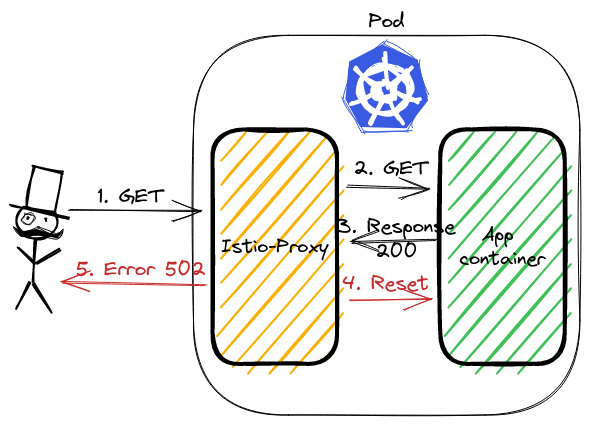
<p>To analyze the traffic we can use <code>tcpdump</code> and Wireshark. Istio-proxy runs as a sidecar, which routes whole incoming and outgoing traffic to pod through own proxy.
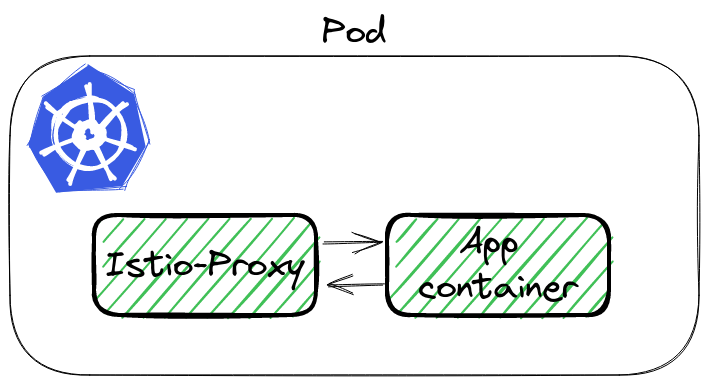
<img src="/posts/kubernetes/how-to-debug-istio-upstream-reset/istio-pod.png" alt="Istio Pod"></p>
<p>To sniff traffic there are 3 ways:</p>
<ol>
<li>Running tcpdump in <code>istio-proxy</code> container,</li>
<li>Using <code>kubectl</code> plugin <code>ksniff</code> - a plugin to kubectl to dump packets from pod, <a href="https://github.com/eldadru/ksniff" target="_blank" rel="noopener">github repo</a>,</li>
<li>Adding additional container to pod, with <code>root</code> permission and <code>tcpdump</code>  installed,</li>
</ol>
<p>The first option will not work by default, because <code>istio-proxy</code> runs without root permission. The third is the backup if 1 and 2 would not work. Let&rsquo;s try <a href="https://github.com/eldadru/ksniff" target="_blank" rel="noopener">ksniff</a>.</p>
<h3 id="what-is-ksniff-">What is ksniff 🛠️</h3>
<p><code>ksniff</code> in three words is a plugin that:</p>
<ul>
<li>figures  out what node is running pod with an app,</li>
<li>deploys an own pod with an affinity to that node, bound to the host network,</li>
<li>opens Wireshark on your laptop with a packet stream from the application.</li>
</ul>
<p>Let&rsquo;s execute it to sniff our application:</p>
<div class="highlight"><pre tabindex="0" style="color:#f8f8f2;background-color:#272822;-moz-tab-size:4;-o-tab-size:4;tab-size:4;-webkit-text-size-adjust:none;"><code class="language-bash" data-lang="bash"><span style="display:flex;"><span>kubectl sniff http-chunked-0 -c istio-proxy -p -f <span style="color:#e6db74">&#39;-i lo&#39;</span> -n default
</span></span></code></pre></div><blockquote>
<p><strong>Important parameters</strong></p>
<ul>
<li><code>-p</code> is a parameter to support sniffing even if the pod is non-privileged. See <a href="https://github.com/eldadru/ksniff#non-privileged-and-scratch-pods" target="_blank" rel="noopener">docs</a>,</li>
<li><code>-f '-i lo'</code> passes filter to tcpdump, we want to sniff localhost interface inside the Pod.</li>
</ul>
</blockquote>
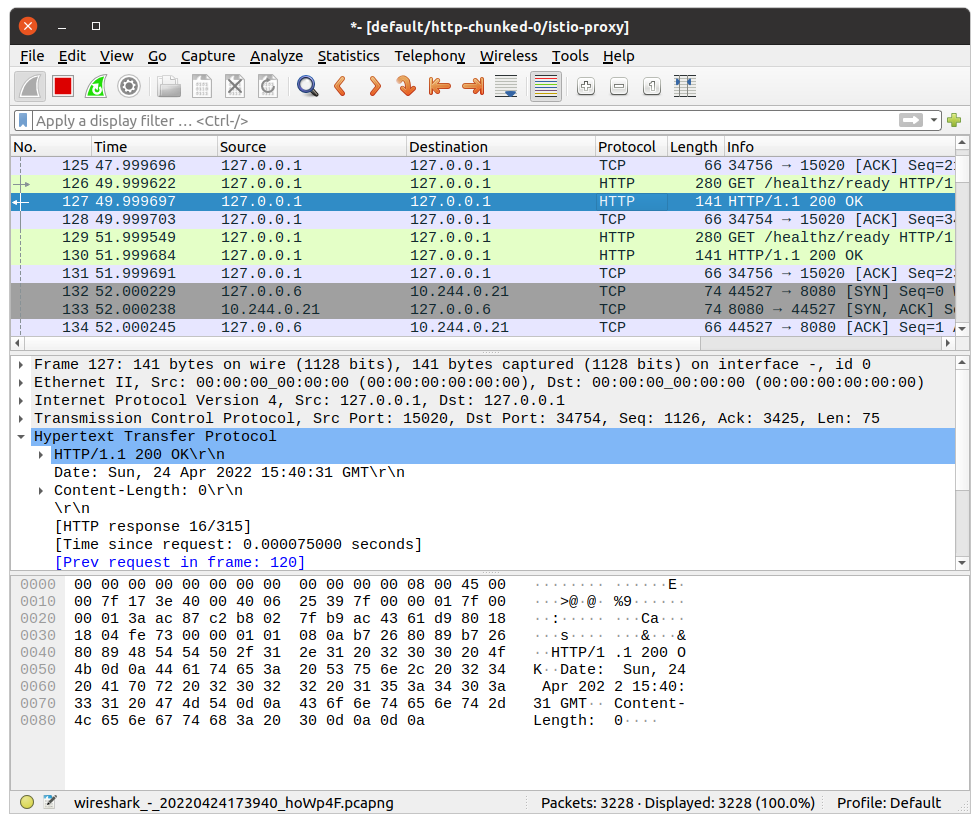
<p>If there is no issue, our system has Wireshark in <code>PATH</code>, <code>ksniff</code> should open a new window
<img src="/posts/kubernetes/how-to-debug-istio-upstream-reset/wireshark_init.png" alt="Wireshark"></p>
<h3 id="finding-the-root-cause-">Finding the root cause 🔎</h3>
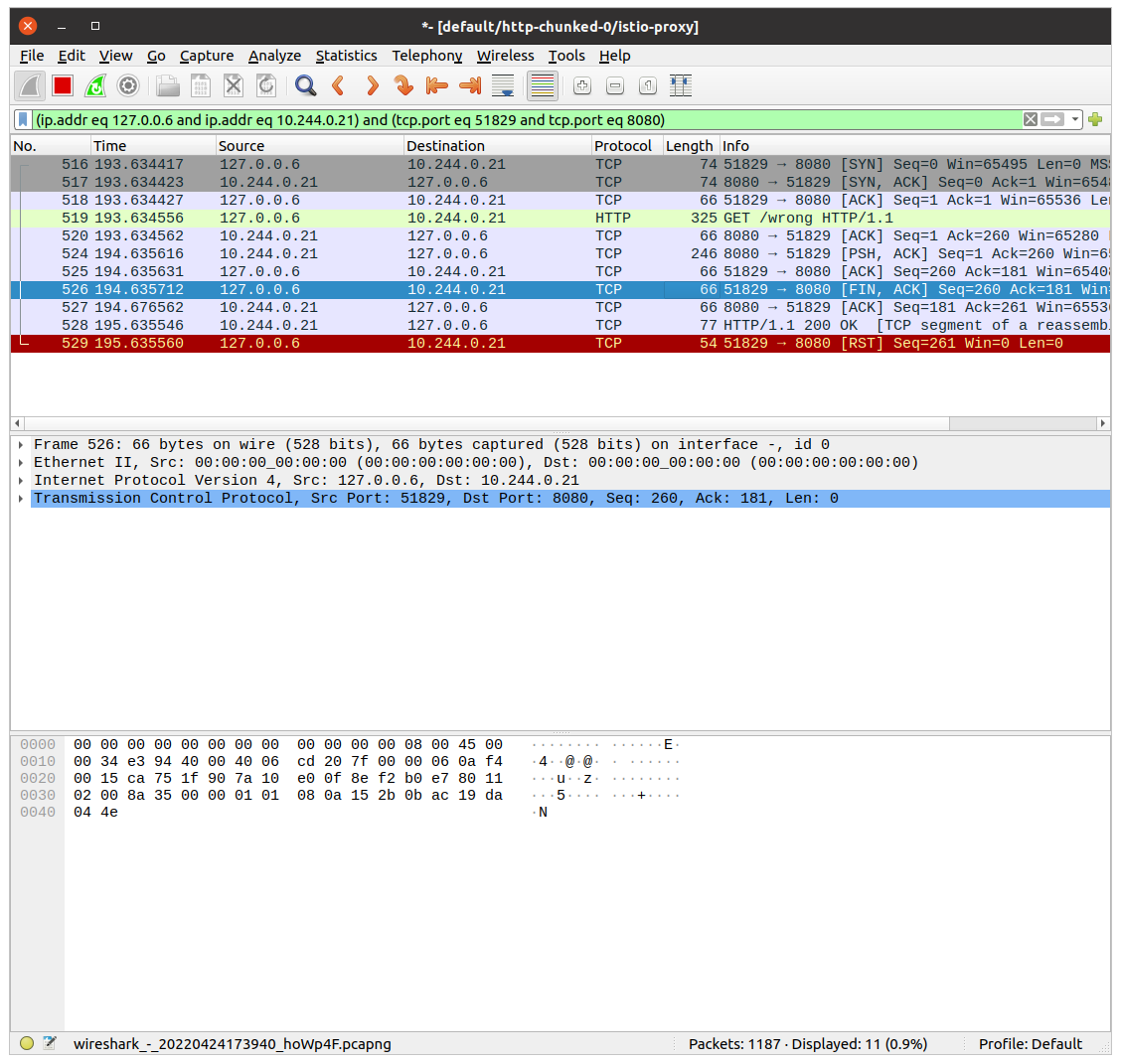
<p>Wireshark will continuously follow with new packet records. It makes it hard to figure out our particular call. We can use filters to help with searching. Knowing the request path, method, response code - we can use it to find our packet using filter:</p>
<div class="highlight"><pre tabindex="0" style="color:#f8f8f2;background-color:#272822;-moz-tab-size:4;-o-tab-size:4;tab-size:4;-webkit-text-size-adjust:none;"><code class="language-bash" data-lang="bash"><span style="display:flex;"><span>http.request.uri <span style="color:#f92672">==</span> <span style="color:#e6db74">&#34;/wrong&#34;</span>
</span></span></code></pre></div><p>It shows only a single packet, our request. Wireshark allows to show the whole TCP conversation:</p>
<ul>
<li>click right click on the packet,</li>
<li>go to <code>Conversation Filter</code>,</li>
<li>select <code>TCP</code>.</li>
</ul>
<p>Wireshark will write a filter to show the whole communication between istio-proxy container and the application container!</p>
<p><img src="/posts/kubernetes/how-to-debug-istio-upstream-reset/wireshark_convesation_filter.png" alt="Wireshark - Filtering the conversation"></p>
<p>Let&rsquo;s see the above image. The first 3 records are the three-way handshake packets. Later is our GET request.  The most interesting happens in the last two packets. Application container returns response HTTP 200 OK. <code>istio-proxy</code> then closes the connection with <code>RST</code> packet.</p>
<p><img src="/posts/kubernetes/how-to-debug-istio-upstream-reset/app_reset.png" alt="Wireshark - Found RST Packet"></p>
<p>This is what we saw in the logs. The flag was <code>upstream_reset_before_response_started{protocol_error}</code>. But why? This still does not explain.</p>
<h3 id="swiss-knife-by-wireshark-">Swiss knife by Wireshark 🪛</h3>
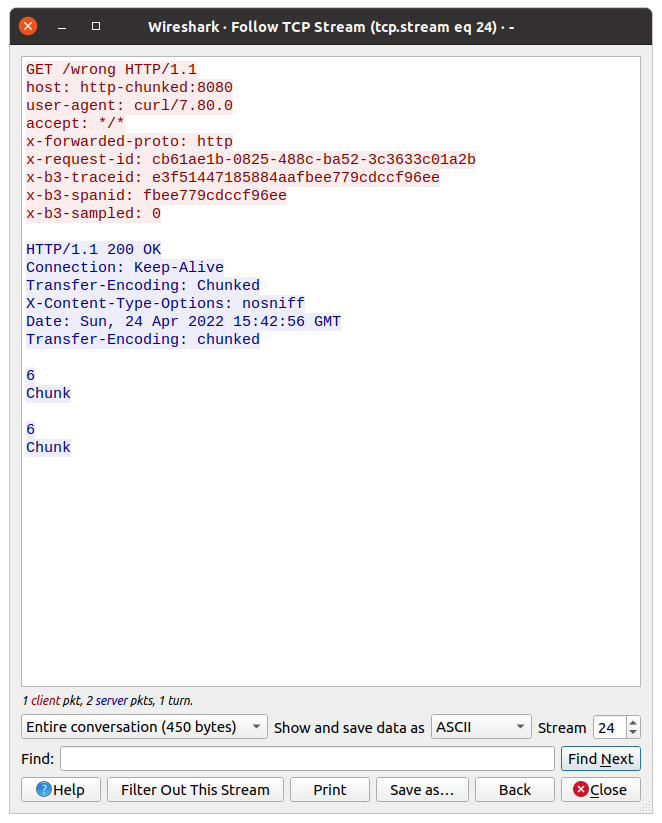
<p>It is hard to read the HTTP protocol from multiple packet bodies. But Wireshark also has a solution for that. We can see data from L7, the application one. In our case, it is the HTTP protocol.</p>
<p>Click with the right mouse on a single packet, go to the <code>Follow</code> tab, and select <code>TCP Stream</code>:</p>
<p><img src="/posts/kubernetes/how-to-debug-istio-upstream-reset/wireshark_tcp_stream.png" alt="Wireshark - Filtering TCP stream"></p>
<p>Now we can check what the request from <code>istio-proxy</code> looked like, and what was the response from the app.
Do you have an idea from the above picture?</p>
<p>Look closer at the response, there is a double <code>Transfer-Encoding</code> header. One starts from uppercase, the second one does not.</p>
<h3 id="double-transfer-encoding-header---what-does-it-mean">Double transfer-encoding header - what does it mean❔</h3>
<p>Searching over Istio issues I found <a href="https://github.com/istio/istio/issues/24753#issuecomment-656380098" target="_blank" rel="noopener">this answer</a>. The most important are the first 2 points:</p>
<blockquote>
<ol>
<li>two <code>transfer-encoding: chunked</code> is equivalent to <code>transfer-encoding: chunked, chunked</code> as per RFC,</li>
<li><code>transfer-encoding: chunked, chunked</code> doesn&rsquo;t have the same semantic as <code>transfer-encoding: chunked</code></li>
</ol>
</blockquote>
<p>Why the response was taken as double-chunked? According to <a href="https://datatracker.ietf.org/doc/html/rfc7230#section-4" target="_blank" rel="noopener">Transfer Codings in Section 4</a>, transfer-coding names <strong>are case-insensitive</strong>.</p>
<h2 id="summary-">Summary 📓</h2>
<p>As you see, Istio stands as a guard 👮‍♂️ of the HTTP protocol. If the app is returning a double-chunked response, then Istio requires it, otherwise, it rejects processing the request. <code>curl</code> ignores this inconsistency.</p>
<p>This issue was one of the most difficult tasks, which I ever had :-)</p>
<h2 id="infrastructure-to-reproduce-and-example-app-">Infrastructure to reproduce and example app 🏭</h2>
<p>In <a href="https://github.com/mjasion/istio-upstream-reset" target="_blank" rel="noopener">Github repository</a> I created example infrastructure to reproduce the problem.</p>
<p>Bootstrap of the infrastructure installs ArgoCD, Istio and the App. The sample app exposes two endpoints:</p>
<ul>
<li><code>/correct</code> - endpoint, which creates a streamed response,</li>
<li><code>/wrong</code> - is doing same as above, but additionally it set value of the <code>Transfer-Encoding</code> header to <code>Chunked</code>(uppercase).</li>
</ul>
<hr>
<p><em>I would like to thank <a href="https://www.linkedin.com/in/przemyslaw-ozimkiewicz/" target="_blank" rel="noopener">Przemysław</a> for his help and for showing me how to use Wireshark efficiently during this issue.🤝🏻</em></p>
]]></content><category scheme="https://b58f7780.mjasion.pages.dev/tags/istio" term="istio" label="istio"/><category scheme="https://b58f7780.mjasion.pages.dev/tags/kubernetes" term="kubernetes" label="kubernetes"/><category scheme="https://b58f7780.mjasion.pages.dev/tags/debugging" term="debugging" label="debugging"/><category scheme="https://b58f7780.mjasion.pages.dev/tags/networking" term="networking" label="networking"/></entry></feed>